Create first command line application using nodeJs
In this tutorial i am going to create a very simple command line application using nodeJs, Nodejs provide great flexibility to create command line application, express-geenrator and nodemon are the best CLI example in nodeJs.
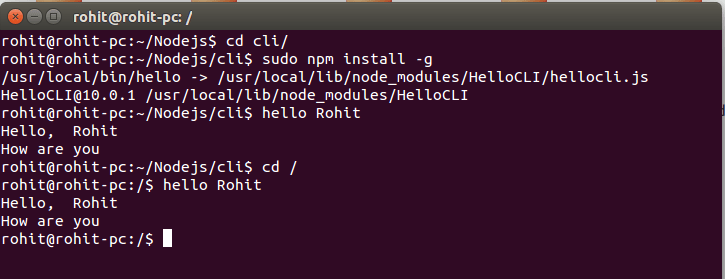
I am going to create a custom command line HelloCli application where i’ll run hello [GIVEN_NAME] in terminal and it’ll return message in terminal like this:-
Hello [GIVEN_NAME],
How are you..!!
Ok Lets start the tutorial step by step
Create your application package.json file
package.json
{
  "name": "HelloCLI",
  "version": "10.0.1",
  "description": "First CLI App",
  "dependencies": {},
  "bin": {
    "hello": "hellocli.js"
  }
}
Where
"bin": {
    "hello": "hellocli.js"
  }
This syntax help node to execute given file like command, So hellocli.js is your custom command file & hello is your custom command you’ll run on terminal
"bin": {
    "COMMAND_NAME": "FILE_NAME"
  }
After that create your CLI file
hellocli.js
#!/usr/bin/env node
console.log("Hello, ",process.argv[2]);
console.log("How are you");
Note: Don’t forget to include #!/usr/bin/env node on the top of the page, this one line tells system that it’s a batch file and act like command.
Now install your command global by running below command.
sudo npm install -g
See below screen shot for output in action.
Thanks 🙂
