Lightweight Angular directive to upload files – ng-file-upload

ng-file-upload is Lightweight Angular directive to upload files with optional FileAPI shim for cross browser support.
angularjs-file-upload
Features

  • file upload progress, cancel/abort
  • file drag and drop (html5 only)
  • image paste from clipboard and drag and drop from browser pages (html5 only).
  • image resize and center crop (native) and user controlled crop through ngImgCrop. See crop sample (html5 only)
  • orientation fix for jpeg image files with exif orientation data
  • resumable uploads: pause/resume upload (html5 only)
  • native validation support for file type/size, image width/height/aspect ratio, video/audio duration, and ng-required with pluggable custom sync or async validations.
  • show thumbnail or preview of selected images/audio/videos
  • supports CORS and direct upload of file’s binary data using Upload.$http()
  • plenty of sample server side code, available on nuget
  • on demand flash FileAPI shim loading no extra load for html5 browsers.
  • HTML5 FileReader.readAsDataURL shim for IE8-9
  • available on npm, bower, meteor, nuget


Installing using NPM

npm install ng-file-upload

Libraries

Use following libraries to enable file upload system using angular js.


HTML

Create file upload form and display uploaded images.

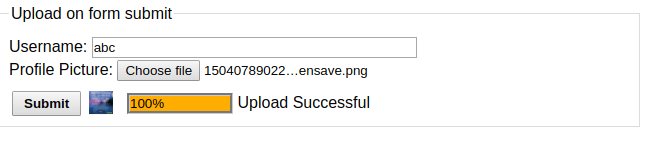
Upload on form submit or button click
Single Image with validations
Select
Multiple files
Select
Drop files:
Drop
Upload right away after file selection:
Upload on file select
Drop File:
Drop Images or PDFs files here
File Drag/Drop is not supported for this browser
Image thumbnail: Audio preview: Video preview:


JS

inject directives and services.

var app = angular.module('fileUpload', ['ngFileUpload']);

app.controller('MyCtrl', ['$scope', 'Upload', function ($scope, Upload) {
    // upload later on form submit or something similar
    $scope.submit = function() {
      if ($scope.form.file.$valid && $scope.file) {
        $scope.upload($scope.file);
      }
    };

    // upload on file select or drop
    $scope.upload = function (file) {
        Upload.upload({
            url: 'upload/url',
            data: {file: file, 'username': $scope.username}
        }).then(function (resp) {
            console.log('Success ' + resp.config.data.file.name + 'uploaded. Response: ' + resp.data);
        }, function (resp) {
            console.log('Error status: ' + resp.status);
        }, function (evt) {
            var progressPercentage = parseInt(100.0 * evt.loaded / evt.total);
            console.log('progress: ' + progressPercentage + '% ' + evt.config.data.file.name);
        });
    };
    // for multiple files:
    $scope.uploadFiles = function (files) {
      if (files && files.length) {
        for (var i = 0; i < files.length; i++) {
          Upload.upload({..., data: {file: files[i]}, ...})...;
        }
        // or send them all together for HTML5 browsers:
        Upload.upload({..., data: {file: files}, ...})...;
      }
    }
}]);

File select and drop

At least one of the ngf-select or ngf-drop are mandatory for the plugin to link to the element.
ngf-select only attributes are marked with * and ngf-drop only attributes are marked with +.


  ngf-drop="" or "upload($files, ...)" 
  ngf-change="upload($files, $file, $newFiles, $duplicateFiles, $invalidFiles, $event)"
    
  ng-model="myFiles" 
  ngf-model-options="{updateOn: 'change click drop dropUrl paste', allowInvalid: false, debounce: 0}"
    
  ngf-model-invalid="invalidFile(s)" 
  ngf-before-model-change="beforeChange($files, ...)" 
  ng-disabled="boolean" 
  ngf-select-disabled="boolean" 
  ngf-drop-disabled="boolean" 
  ngf-multiple="boolean" 
  ngf-keep="true|false|'distinct'" 
  ngf-fix-orientation="boolean" 

  *ngf-capture="'camera'" or "'other'" 
  *ngf-accept="'image/*'" 

  +ngf-allow-dir="boolean" 
  +ngf-include-dir="boolean" 
  +ngf-drag-over-class="{pattern: 'image/*', accept:'acceptClass', reject:'rejectClass', delay:100}"
                    or "'myDragOverClass'" or "calcDragOverClass($event)"
    
  +ngf-drag="drag($isDragging, $class, $event)" 
  +ngf-drop-available="dropSupported" 
  +ngf-stop-propagation="boolean" 
  +ngf-hide-on-drop-not-available="boolean" 
  +ngf-enable-firefox-paste="boolean" 

  ngf-resize="{width: 100, height: 100, quality: .8, type: 'image/jpeg',
               ratio: '1:2', centerCrop: true, pattern='.jpg', restoreExif: false}"
               or resizeOptions() 
  ngf-resize-if="$width > 1000 || $height > 1000" or "resizeCondition($file, $width, $height)"
    
  ngf-validate-after-resize="boolean" 

  
  ngf-max-files="10" 
  ngf-pattern="'.pdf,.jpg,video/*,!.jog'" 
  ngf-min-size, ngf-max-size, ngf-max-total-size="100" in bytes or "'10KB'" or "'10MB'" or "'10GB'"
    
  ngf-min-height, ngf-max-height, ngf-min-width, ngf-max-width="1000" in pixels only images
    
  ngf-ratio="8:10,1.6" 
  ngf-min-ratio, ngf-max-ratio="8:10" 
  ngf-dimensions="$width > 1000 || $height > 1000" or "validateDimension($file, $width, $height)"
    
  ngf-min-duration, ngf-max-duration="100.5" in seconds or "'10s'" or "'10m'" or "'10h'" only audio, video
    
  ngf-duration="$duration > 1000" or "validateDuration($file, $duration)"
    

  ngf-validate="{size: {min: 10, max: '20MB'}, width: {min: 100, max:10000}, height: {min: 100, max: 300}
                ratio: '2x1', duration: {min: '10s', max: '5m'}, pattern: '.jpg'}"
    
  ngf-validate-fn="validate($file)" 
  ngf-validate-async-fn="validate($file)" 
  ngf-validate-force="boolean" 
  ngf-ignore-invalid="'pattern maxSize'" 
  ngf-run-all-validations="boolean" 

>Upload/Drop
File Drag/drop is not supported
image

File preview


  *ngf-background="file" 
  ngf-resize="{width: 20, height: 20, quality: 0.9}" 
  ngf-no-object-url="true or false" 
>


 ngf-size="{width: 20, height: 20, quality: 0.9}" the image will be resized to this size
        
 ngf-as-background="boolean" 
>


Handle file upload using following upload services.

var upload = Upload.upload({
  *url: 'server/upload/url', // upload.php script, node.js route, or servlet url
  /*
  Specify the file and optional data to be sent to the server.
  Each field including nested objects will be sent as a form data multipart.
  Samples: {pic: file, username: username}
    {files: files, otherInfo: {id: id, person: person,...}} multiple files (html5)
    {profiles: {[{pic: file1, username: username1}, {pic: file2, username: username2}]} nested array multiple files (html5)
    {file: file, info: Upload.json({id: id, name: name, ...})} send fields as json string
    {file: file, info: Upload.jsonBlob({id: id, name: name, ...})} send fields as json blob, 'application/json' content_type
    {picFile: Upload.rename(file, 'profile.jpg'), title: title} send file with picFile key and profile.jpg file name*/
  *data: {key: file, otherInfo: uploadInfo},
  /*
  This is to accommodate server implementations expecting nested data object keys in .key or [key] format.
  Example: data: {rec: {name: 'N', pic: file}} sent as: rec[name] -> N, rec[pic] -> file
     data: {rec: {name: 'N', pic: file}}, objectKey: '.k' sent as: rec.name -> N, rec.pic -> file */
  objectKey: '[k]' or '.k' // default is '[k]'
  /*
  This is to accommodate server implementations expecting array data object keys in '[i]' or '[]' or
  ''(multiple entries with same key) format.
  Example: data: {rec: [file[0], file[1], ...]} sent as: rec[0] -> file[0], rec[1] -> file[1],...
    data: {rec: {rec: [f[0], f[1], ...], arrayKey: '[]'} sent as: rec[] -> f[0], rec[] -> f[1],...*/
  arrayKey: '[i]' or '[]' or '.i' or '' //default is '[i]'
  method: 'POST' or 'PUT'(html5), default POST,
  headers: {'Authorization': 'xxx'}, // only for html5
  withCredentials: boolean,
  /*
  See resumable upload guide below the code for more details (html5 only) */
  resumeSizeUrl: '/uploaded/size/url?file=' + file.name // uploaded file size so far on the server.
  resumeSizeResponseReader: function(data) {return data.size;} // reads the uploaded file size from resumeSizeUrl GET response
  resumeSize: function() {return promise;} // function that returns a prommise which will be
                                            // resolved to the upload file size on the server.
  resumeChunkSize: 10000 or '10KB' or '10MB' // upload in chunks of specified size
  disableProgress: boolean // default false, experimental as hotfix for potential library conflicts with other plugins
  ... and all other angular $http() options could be used here.
})

// returns a promise
upload.then(function(resp) {
  // file is uploaded successfully
  console.log('file ' + resp.config.data.file.name + 'is uploaded successfully. Response: ' + resp.data);
}, function(resp) {
  // handle error
}, function(evt) {
  // progress notify
  console.log('progress: ' + parseInt(100.0 * evt.loaded / evt.total) + '% file :'+ evt.config.data.file.name);
});
upload.catch(errorCallback);
upload.finally(callback, notifyCallback);

/* access or attach event listeners to the underlying XMLHttpRequest */
upload.xhr(function(xhr){
  xhr.upload.addEventListener(...)
});

/* cancel/abort the upload in progress. */
upload.abort();

/*
alternative way of uploading, send the file binary with the file's content-type.
Could be used to upload files to CouchDB, imgur, etc... html5 FileReader is needed.
This is equivalent to angular $http() but allow you to listen to the progress event for HTML5 browsers.*/
Upload.http({
  url: '/server/upload/url',
  headers : {
    'Content-Type': file.type
  },
  data: file
})

/* Set the default values for ngf-select and ngf-drop directives*/
Upload.setDefaults({ngfMinSize: 20000, ngfMaxSize:20000000, ...})

// These two defaults could be decreased if you experience out of memory issues
// or could be increased if your app needs to show many images on the page.
// Each image in ngf-src, ngf-background or ngf-thumbnail is stored and referenced as a blob url
// and will only be released if the max value of the followings is reached.
Upload.defaults.blobUrlsMaxMemory = 268435456 // default max total size of files stored in blob urls.
Upload.defaults.blobUrlsMaxQueueSize = 200 // default max number of blob urls stored by this application.

/* Convert a single file or array of files to a single or array of
base64 data url representation of the file(s).
Could be used to send file in base64 format inside json to the databases */
Upload.base64DataUrl(files).then(function(urls){...});

/* Convert the file to blob url object or base64 data url based on boolean disallowObjectUrl value */
Upload.dataUrl(file, boolean).then(function(url){...});

/* Get image file dimensions*/
Upload.imageDimensions(file).then(function(dimensions){console.log(dimensions.width, dimensions.height);});

/* Get audio/video duration*/
Upload.mediaDuration(file).then(function(durationInSeconds){...});

/* Resizes an image. Returns a promise */
// options: width, height, quality, type, ratio, centerCrop, resizeIf, restoreExif
//resizeIf(width, height) returns boolean. See ngf-resize directive for more details of options.
Upload.resize(file, options).then(function(resizedFile){...});

/* returns boolean showing if image resize is supported by this browser*/
Upload.isResizeSupported()
/* returns boolean showing if resumable upload is supported by this browser*/
Upload.isResumeSupported()

/* returns a file which will be uploaded with the newName instead of original file name */
Upload.rename(file, newName)
/* converts the object to a Blob object with application/json content type
for jsob byte streaming support #359 (html5 only)*/
Upload.jsonBlob(obj)
/* converts the value to json to send data as json string. Same as angular.toJson(obj) */
Upload.json(obj)
/* converts a dataUrl to Blob object.*/
var blob = upload.dataUrltoBlob(dataurl, name);
/* returns true if there is an upload in progress. Can be used to prompt user before closing browser tab */
Upload.isUploadInProgress() boolean
/* downloads and converts a given url to Blob object which could be added to files model */
Upload.urlToBlob(url).then(function(blob) {...});
/* returns boolean to check if the object is file and could be used as file in Upload.upload()/http() */
Upload.isFile(obj);
/* fixes the exif orientation of the jpeg image file*/
Upload.applyExifRotation(file).then(...)

See live demo and download source code.

DEMO | DOWNLOAD

This awesome plugin is developed by danialfarid. Visit their official github repository for more information and follow for future updates.