Session Handling Using Nodejs And Express 4 With Jade Template Engine
This tutorial will explain you some basics of Session in Nodejs and Express 4, Here you’ll learn how to store, retrieve and destroy session value on your web page in Nodejs and Express 4 .
Session plays very important role in any web based application to travel user’s sensitive or non sensitive data from page to page.
We all know lot’s of module of Express 3 has been deprecated, So here i am using all latest modules with Express 4.
First of all create you dependency manager file called package.json which will help you to install all the require dependencies in our project directory.
package.json
{
  "name": "NodeJs-Session",
  "version": "0.0.1",
  "description": "Session Handling using Nodejs & Express",
  "dependencies": {
    "body-parser": "~1.13.1",
    "express": "^4.13.3",
    "express-session": "^1.11.3",
    "jade": "^1.11.0"
  }
}
After that run below command to install dependencies from package.json file
npm install
Create views folder in your project directory where you’ll create you html pages, your project directory structure will be.
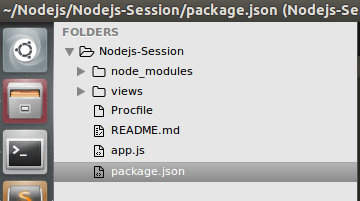
Create file app.js where we are going to write our server side script to start server and handle session.
app.js
/*
* Author: Rohit Kumar
* Date: 03-09-2015
* Website: iamrohit.in
* App Name: Session Handling using Nodejs & Express 4
* Description: This is a simple script to demonstrate session handling in nodejs and express 4
*/
var http=require('http');
var express=require('express');
var path=require('path');
var bodyParser = require('body-parser');
var session = require('express-session');
var app=express();
var port = Number(process.env.PORT || 5000);
app.use(session({secret: 'ABCDEF123456789', cookie: { maxAge: 60000 }})); // Set some rendom secret value for your session
app.set('views', path.join(__dirname, 'views'));
app.set('view engine', 'jade');
app.use(bodyParser.json()); // to support JSON-encoded bodies
app.use(bodyParser.urlencoded({
  extended: true
}));

app.get('/',function(req,res){
   if(!req.session.name && !req.session.email) {
       res.render('index');
    } else {
        res.render('index', {name:req.session.name, email:req.session.email});
    }
});

// create session
app.post('/',function(req,res){
  if(req.body.name && req.body.email) {
        req.session.name = req.body.name;
        req.session.email = req.body.email;
        result = req.session;
  }
   res.redirect('/');
});

//destroy session
app.get('/destroy', function(req, res) {
   req.session.destroy(function(err){
      if(err){
        console.log(err);
      }
      else
      {
        res.redirect('/');
      }
    });
});

// Starting server
var server = http.createServer(app).listen(port, function() {
console.log("Listening on "+port);
});
Create index.jade file in views folder. I am using jade template engine, You can learn more ablout jade form here http://www.iamrohit.in/jade-node-template-engine-with-expressjs-example/
index.jade
doctype html
html(lang='en')
  head
    meta(charset='utf-8')
    meta(http-equiv='X-UA-Compatible', content='IE=edge')
    meta(name='viewport', content='width=device-width, initial-scale=1')
    title Session Handling using Nodejs & Express 4
    link(rel='stylesheet', href='https://maxcdn.bootstrapcdn.com/bootstrap/3.3.4/css/bootstrap.min.css')
  body
    .panel.panel-primary(style='width:50%;margin:0 auto; margin-top:10%')
      .panel-heading
        h3 Session Handling using Nodejs & Express 4
      .panel-body(style='height:40%; text-align:center;')
        p#msg.bg-info
        form#emailForm.form-horizontal(role='form', method='post')
          .form-group
            label.control-label.col-sm-2(for='name') Name:
            .col-sm-10
             if(!name)
              input.form-control(type='text', name='name', placeholder='Enter name', required='required')
             else
               h4 #{name}
          .form-group
            label.control-label.col-sm-2(for='email') Email:
            .col-sm-10
             if(!email)
              input.form-control(type='email', name='email', placeholder='Enter email', required='required')
             else
               h4 #{email}
          .form-group
            .col-sm-offset-2.col-sm-10
             if(!name && !email)
              button#send.btn.btn-primary.btn-lg(type='submit')
                |  Create Session
             else
               a(href="/destroy" class="btn btn-primary btn-lg")
                   span Destroy Session
    script(src='http://ajax.googleapis.com/ajax/libs/jquery/1.11.2/jquery.min.js')
    script(src='https://maxcdn.bootstrapcdn.com/bootstrap/3.3.4/js/bootstrap.min.js')
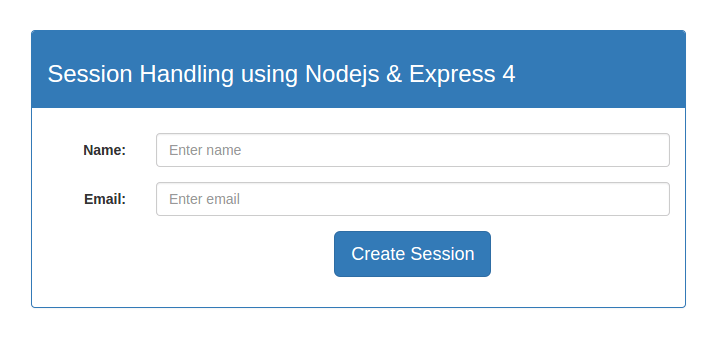
Now all is done time to run our project.
cd YourProjectDirectory
node app.js
Note: This is storing session value for temporary bases whenever you restart your server session will be destroy, For storing session permanent bases you need to use redis or mongodb any other nosql database.
I hope this tutorial will help you to understand session handling in Nodejs and Express 4.
See demo and download source code by clicking on download button.
