Simple OOPS based login and registration script in php and mysql
This is premium tutorial for all core php developers whose first task is to create signin and signup feature for any web based applications.
So here i come up with the latest oops based signin and signup script for geek php developers who loves oops concept. this script fully developed in oops concept with exceptional handling support PHP V5.5+
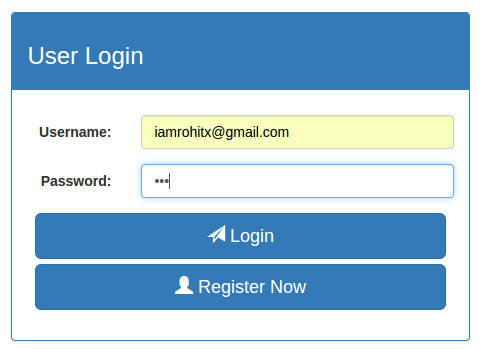
So lets start tutorial..
Step:1- Create database php-auth
Step:2- Create users table where user login information will be store.
CREATE TABLE IF NOT EXISTS `users` (
  `id` int(11) NOT NULL AUTO_INCREMENT,
  `name` varchar(100) NOT NULL,
  `username` varchar(50) NOT NULL,
  `password` varchar(50) NOT NULL,
  PRIMARY KEY (`id`),
  UNIQUE KEY `username` (`username`)
) ENGINE=InnoDB DEFAULT CHARSET=latin1 AUTO_INCREMENT=1 ;
Step:3- Your project directory and file structure will be.
+-php-auth
+---css
+---js
+---classes
+-----dbconfig.php
+-----userClass.php
+---function.php
+---header.php
+---footer.php
+---index.php
+---registration.php
+---profile.php
Step:4- Now create our first class file to connect database.
classes/dbconfig.php
getMessage();
     }
  }

 // close connection
  public static function close() {
     mysqli_close(self::$con);
  }

// run query
  public static function run($query) {
    try {
      if(empty($query) && !isset($query)) {
        throw new exception("Query string is not set.");
      }
      $result = mysqli_query(self::$con, $query);
      //self::close();
     return $result;
    } catch (Exception $e) {
      echo "Error: ".$e->getMessage();
    }

  }

}
Update above file with your database credentials.
Step:5- Now create another class file which handle your all user’s business logic and database operation like user registration, login, profile etc.
classes/userClass.php
'success', 'msg'=>"You have been registered successfully login now.", 'result'=>'');
      }
     } catch (Exception $e) {
       $data = array('status'=>'error', 'msg'=>$e->getMessage());
     } finally {
        return $data;
     }
   }

  // Check if user already exist
   public static function checkUserExist($username) {
     try {
       $query = "SELECT username FROM users WHERE username = '".$username."'";
       $result = dbconfig::run($query);
       if(!$result) {
         throw new exception("Error in query!");
       }
       $count = mysqli_num_rows($result);
       if($count>0) {
          throw new exception("Username already exist.");
       }
       $data = array('status'=>'success', 'msg'=>"", 'result'=>'');
     } catch (Exception $e) {
      echo  $data = array('status'=>'error', 'msg'=>$e->getMessage());
     } finally {
        return $data;
     }
   }

// Check if username/password is incorrect
   public static function checkUser($username, $password) {
     try {
       $query = "SELECT username FROM users WHERE username = '".$username."' and password = '".md5($password)."'";
       $result = dbconfig::run($query);
       if(!$result) {
         throw new exception("Error in query!");
       }
       $count = mysqli_num_rows($result);
       if($count == 0) {
          throw new exception("Username/Password is incorrect.");
       }
       $data = array('status'=>'success', 'msg'=>"", 'result'=>'');
     } catch (Exception $e) {
      echo  $data = array('status'=>'error', 'msg'=>$e->getMessage());
     } finally {
        return $data;
     }
   }

  // login function
   public static function login($username, $password) {
     try {
        $check = self::checkUser($username, $password);
       if($check['status'] == 'error') {
       $data = $check;
       } else {
       $query = "SELECT id FROM users WHERE username = '".$username."' AND password = '".md5($password)."'";
       $result = dbconfig::run($query);
       if(!$result) {
         throw new exception("Error in query!");
       }
       $resultSet = mysqli_fetch_assoc($result);
       $data = array('status'=>'success', 'msg'=>"User detail fetched successfully.", 'result'=>$resultSet);
      }
     } catch (Exception $e) {
       $data = array('status'=>'error', 'msg'=>$e->getMessage());
     } finally {
        return $data;
     }
   }

  // Get user information by userid
  public static function getUserById($id) {
     try {
       $query = "SELECT * FROM users WHERE id=".$id;
       $result = dbconfig::run($query);
       if(!$result) {
         throw new exception("Error in query");
       }
       $resultSet = mysqli_fetch_assoc($result);
       $data = array('status'=>'success', 'tp'=>1, 'msg'=>"User detail fetched successfully", 'result'=>$resultSet);
     } catch (Exception $e) {
       $data = array('status'=>'error', 'tp'=>0, 'msg'=>$e->getMessage());
     } finally {
        return $data;
     }
   }

}
Step:6- Now time to create all views pages like login, registration and profile page.
Fist we’ll create common header and footer part of all the pages.
header.php
PHP Auth
footer.php
Index page will be your landing page. Don’t forget to include header and footer part in your all pages.
index.php
User Login
register.php
User Registration
This page will appear after user successfully logged-in.
profile.php
getUserById($_SESSION['result']['id']);
//echo ""; print_r($userInfo); exit;
?>
User Profile
Step:7- After successfully creation of all views pages create one more file function.php which will handle all your form and link request.
function.php
If you have setup all the steps successfully run your application on browser and enjoy..
You can see live working demo by clicking on the demo button and download source code, After that you can make changes according to your need..
Cheers 🙂
