Dropshipping Calculator India
Easily calculate profit & loss for your dropshipping business with our simple dropshipping calculator tool. Find out your profits, total revenue, and more to help improve your strategy.
| Margin: | ₹0.00 |
|---|---|
| Total Order Value: | ₹0.00 |
| RTO Qty: | 0 |
| Orders Delivered: | 0 |
| RTO Cost: | ₹0.00 |
| Ads Cost: | ₹0.00 |
| Total Purchase Cost: | ₹0.00 |
| Revenue Generated: | ₹0.00 |
| Profit/Loss: | ₹0.00 |
If you purchase products for ₹0.00 each and sell them for ₹0.00 each, and you receive a total of 0 orders, with 0 orders delivered, your overall profit or loss would be ₹0.00.
How to Use the Dropshipping Calculator Tool
The Dropshipping Calculator is designed to help you analyze key financial metrics for your dropshipping business. By inputting your product costs and sales data, you can quickly determine your profit margins, total revenue, and other essential figures that inform your business strategy.
Step-by-Step Guide
Step 1: Access the Calculator
Navigate to the Dropshipping Calculator tool via the provided link on your website.
Step 2: Input Product Details
Fill in the following fields to get started:
- Purchase Price (₹): Enter the cost at which you acquire the product.
Example: If you buy a product for ₹500, input500. - Sales Price (₹): Enter the price at which you plan to sell the product.
Example: If you sell the product for ₹800, input800. - Orders Received: Enter the total number of orders you have received for the product.
Example: If you received 50 orders, input50. - Cancelled Quantity: Enter the number of orders that were cancelled.
Example: If 5 orders were cancelled, input5. - RTO % (Return to Origin Percentage): Enter the percentage of orders that are expected to be returned.
Example: If you expect 10% returns, input10. - Ads Cost per Product (₹): Enter the advertising cost incurred for each product sold.
Example: If you spend ₹100 on ads per product, input100.
Step 3: View Results
Once you've entered all necessary information, the calculator will automatically display results in the right column:
- Margin: The profit made on each product sold after subtracting the purchase price from the sales price.
- Total Order Value: The total income generated from all orders received.
- RTO Quantity: The number of orders expected to be returned.
- Orders Delivered: The number of orders that are delivered successfully.
- RTO Cost: The financial loss incurred due to returned orders.
- Ads Cost: The total amount spent on advertising for all orders.
- Total Purchase Cost: The overall expenditure on products, including returns and advertising costs.
- Revenue Generated: The income after accounting for total costs.
- Profit/Loss: The final profit or loss for the business based on the inputs provided.
Step 4: Interpret the Summary
Below the results, the summary section will provide a concise statement of your inputs and the resulting profit or loss. This helps you understand the financial implications of your pricing and order data.
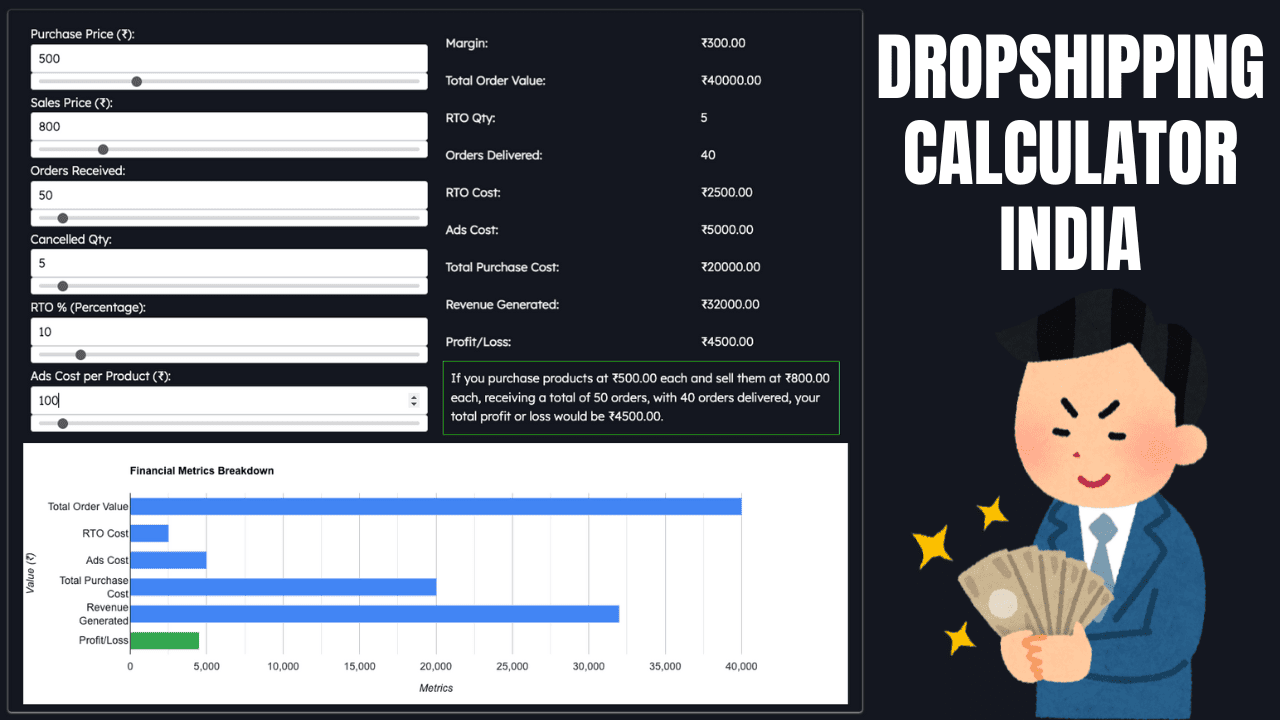
Example Scenario
Consider the following inputs:
- Purchase Price: ₹500
- Sales Price: ₹800
- Orders Received: 50
- Cancelled Quantity: 5
- RTO %: 10%
- Ads Cost per Product: ₹100
Calculation Breakdown
- Margin: ₹800 - ₹500 = ₹300
- Total Order Value: ₹800 * 50 = ₹40,000
- RTO Quantity: 50 * 10% = 5
- Orders Delivered: 50 - 5 - 5 = 40
- RTO Cost: 5 * ₹500 = ₹2,500
- Ads Cost: ₹100 * 50 = ₹5,000
- Total Purchase Cost: ₹500 * 40 = ₹20,000
- Revenue Generated: ₹800 * 40 = ₹32,500
- Profit/Loss: ₹32,500 - ₹20,000 - ₹2,500 -₹5,000 = ₹4,500
Summary Output
The summary will read:
If you purchase products at ₹500.00 each and sell them at ₹800.00 each, receiving a total of 50 orders, with 40 orders delivered, your total profit would be ₹4,500.00.
FAQs
Q1: What if I enter incorrect data?
Make sure to review your inputs carefully. The calculator automatically updates results based on your inputs, so correcting any errors will provide you with accurate results.
Q2: Can I use this calculator for multiple products?
Yes, you can input data for one product at a time. If you want to analyze different products, simply clear the current inputs and enter new data.
Q3: How does the calculator handle RTO?
The calculator computes the RTO quantity based on the RTO percentage you provide. This helps you understand potential returns and their impact on your profits.
Q4: Is the tool responsive to changes?
Yes, the calculator dynamically updates the results as you input or adjust values. You’ll see real-time calculations reflecting your changes.
Q5: Can I access this calculator on mobile devices?
Yes, the Dropshipping Calculator is designed to be responsive and can be used on both desktop and mobile devices.
Q6: What if I need more help?
If you need further assistance, feel free to reach out through the contact information provided on the website, or check the help section for more detailed guides and tips.
This guide should provide you with a comprehensive understanding of how to effectively use the Dropshipping Calculator to optimize your business strategy.